Professional show control

A presentationserver forlive events

Show Distro gives one operator control of the running order, presenter notes, media cues, timer, presenter views, outputs, and Main + Backup presentation computers.

  • Keynote
  • PowerPoint
  • PDF
  • Main + Backup

Founding beta for Apple silicon and Intel Macs

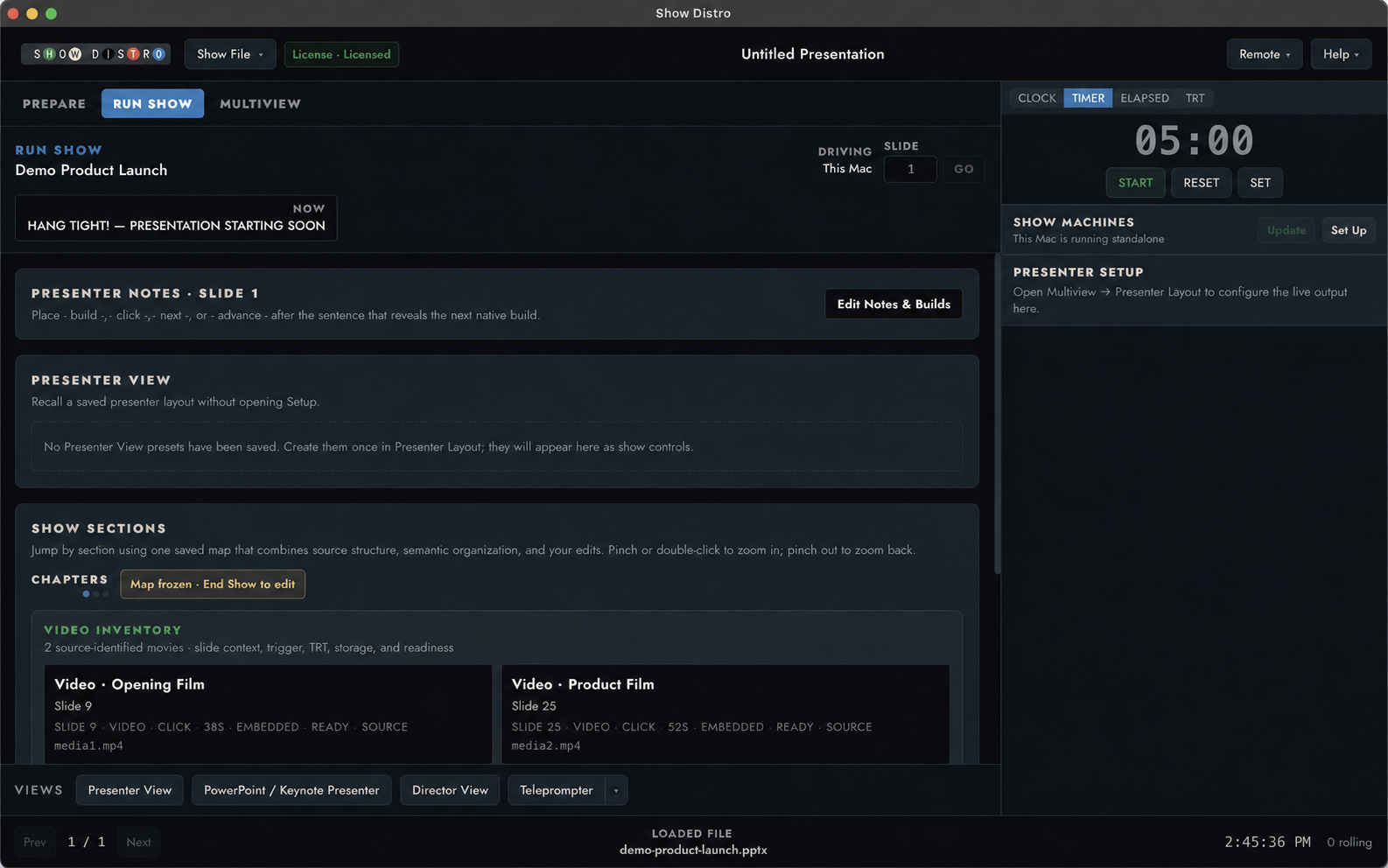
The actual Show Distro Run Show pane with a generic demo deck, presenter notes, show sections, video inventory, timer, and show machines
ACTUAL RUN SHOW CONTROL PANEDECK · NOTES · SECTIONS · MEDIA · TIMER
THE WORKFLOW From the client’s deck to a prepared show.
  1. 01Open the client deckKeynote, PowerPoint, or PDF
  2. 02Add the production workNotes, media, cues, and timing
  3. 03Prepare Main and BackupThe same reviewed show on both
  4. 04Run it from ControlQueue, clock, views, and outputs
Deck revisions

Replace the deck without rebuilding the show.

Show Distro compares the new Keynote or PowerPoint file with the version you rehearsed. Cues, notes, and presenter settings that still match carry forward; anything that moved is held for review.

  1. 01
    ADD

    Use the native deck

    Bring in Keynote, PowerPoint, or PDF without converting it into a second presentation format.

    KEY / PPT / PDF
  2. 02
    PROGRAM

    Add what production needs

    Attach presenter layouts, scripts, notes, timers, media, room cues, and output routes.

    VIEWS / CUES / MEDIA
  3. 03
    PREPARE

    Prepare Main and Backup

    Send the same reviewed deck and show setup to both machines before LOAD or GO.

    MAIN + BACKUP
  4. 04
    RUN

    Operate from Control

    Keep the queue, timing, presenter views, commands, and machine state together on the local show network.

    CONTROL
  5. 05
    REPLACE

    Review the revised deck

    See what still matches, resolve anything that moved, then send the approved revision to Main and Backup.

    REVISION
How the room connects

Keep everyone on the same page.

The operator, Main and Backup presentation computers, presenter, and director all follow the same deck, cues, notes, and timing.

See the complete operator workflow
01
DECKS + REVISIONS

Use Keynote, PowerPoint, and PDF files directly.

Add native decks alongside scripts and notes. When a new version arrives, compare it with the rehearsed deck and review anything that no longer matches.

  • Structural comparison
  • Slide + section addressing
  • Local processing
02
CUES + MEDIA

Add media, cues, timers, and outputs.

Attach external media, countdowns, presenter messages, show sections, output routes, and audio, lighting, HTTP, TCP, UDP, or OSC cues.

  • Media + cue stacks
  • Timers + TRT
  • Output intent
03
PRESENTER + DIRECTOR

Give the presenter and director their own views.

Build presenter confidence layouts and an independent teleprompter. Director can monitor Program, Presenter, Light Table, sections, timing, and messages.

  • Saved presenter presets
  • Independent teleprompter
  • Director multiview
04
OPERATOR CONTROL

Run the show from Control, Stream Deck, or Companion.

Use the Show Distro Control app or the direct Stream Deck plugin. A local Companion beta module and optional authenticated OSC, UDP, and TCP inputs are also available.

  • Stream Deck direct
  • Companion beta module
  • Optional network input
Run Show

Control the presentation from one pane.

Run Show puts the active deck, slide notes, section map, video cues, presenter view, timer, and presentation computers in front of the operator.

The Show Distro Run Show control pane running a generic demo presentation on macOS
Show Distro Run Show · current product build
  1. 01
    Current deck and slide

    See what is live, what comes next, and which presentation computer is driving.

  2. 02
    Notes, sections, and media

    Keep presenter notes, section jumps, and attached video cues within reach.

  3. 03
    Timer and show machines

    Run the clock and check Main and Backup without leaving the control pane.

CONTROL, MAIN + BACKUP / PRIVATE LANLOCAL NETWORK
OPERATORCONTROLRUNS THE SHOW
PRESENTATION COMPUTERMAINREADY
BACKUP COMPUTERBACKUPREADY
DECKCUES + VIEWSOUTPUTSSAME REVIEWED SHOW
Local show network

Control, Main, and Backup communicate on your local network.

Internet access is not required to run a prepared show. Enrollment, updates, Box, and other optional connected services remain separate from show operation.

  1. 01
    The same reviewed show on both computersControl sends the selected deck, cues, and output assignment to Main and Backup and verifies the exact version.
  2. 02
    Ready means the files matchA presentation computer is not marked ready if its show package is missing or out of date.
  3. 03
    Rehearse the actual equipmentTest the Macs, displays, adapters, presentation apps, network, and fallback plan before the event.
Review the technical setup
Founding beta · macOS

Put Show Distro through a real rehearsal.

We are inviting live-event professionals to rehearse Show Distro with the Macs, displays, presentation apps, network, and backup plan they already use.

  • One operator seat for one Control, Main, and Backup configuration
  • Apple silicon and Intel Mac builds
  • Direct support and in-app feedback
  • Local deck, script, and presenter-note processing
INVITATION ONLY Free during the founding beta Request an invitation Review beta terms →
Straight answers

What operators need to know.

Does Show Distro replace PowerPoint or Keynote?

No. PowerPoint and Keynote continue to run the native presentation while Show Distro adds the production layer around it. PDFs can also play directly.

What happens when the client sends a revised deck?

Show Distro compares the new file with the current presentation, preserves production mappings that still resolve decisively, and flags changed or ambiguous material for operator review before promotion and redistribution.

Does it need internet at showtime?

No. Once the show is prepared, installed-license verification and show operation work locally. Box, enrollment, updates, web content, and other connected services are separate from the critical showtime authority path.

Is Main and Backup automatic failover?

Show Distro coordinates and verifies a Main and Backup show group, with guarded recovery behavior. It is not a substitute for rehearsing the exact rig, network, signal path, and fallback plan.

Which Macs are supported?

The founding beta includes Apple silicon and Intel Mac builds. Exact Macs, macOS versions, display paths, adapters, and presentation-app versions still need rehearsal before live use.